


A regular smartphone is often the wrong tool for a parent living with dementia — too many icons, too many ways to get lost in a menu, too easy to accidentally call a stranger or fall for a scam text. Finding the best phones for elderly parents with dementia means looking for something very different: fewer choices, bigger buttons or pictures, and a way for you, as the caregiver, to stay connected and keep them safe without hovering. This guide covers exactly what to look for, reviews three specific phones that consistently stand out for families in this situation, and helps you match the right option to where your parent is right now.
Disclosure: This article contains product recommendations and may include affiliate links, meaning we may earn a small commission if you make a purchase, at no extra cost to you. Prices and promotions change frequently — always confirm current pricing directly with the retailer or manufacturer before buying.
Key Takeaways
- Six in 10 people living with dementia will wander at least once, according to the Alzheimer’s Association, which makes GPS location and simplicity two of the most important features to look for in a phone.
- The RAZ Memory Cell Phone is the most dementia-specific option, using photo-based dialing and full remote caregiver management, for around $349 plus a service plan.
- The Jitterbug Flip2 from Lively is a simpler, budget-friendly flip phone with large buttons and an urgent response button, typically under $80.
- Apple’s Assistive Access, a free built-in iPhone feature, simplifies an existing smartphone into large, image-based icons, ideal for families already using iPhones.
- GPS tracking is a valuable safety layer, but according to the Alzheimer’s Association, no location tracking system is 100% accurate, so it should be paired with other safety measures, not relied on alone.
Why the Right Phone Matters
Choosing a phone for a parent with dementia isn’t just about convenience — it’s genuinely a safety decision. According to the Alzheimer’s Association, six in 10 people living with dementia will wander at least once, and many do so repeatedly. A phone with reliable location sharing can be the difference between a quick check-in and a frightening, drawn-out search.
At the same time, standard smartphones create their own risks. The Alzheimer’s Association’s technology safety guidance specifically warns about phone-based scams targeting older adults, including callers or texters impersonating banks or government agencies. A simplified phone that only allows calls to and from a caregiver-approved contact list removes most of that risk entirely, simply by design.
There’s also a quieter, everyday benefit worth mentioning: staying reachable helps preserve your parent’s connection to family and friends for as long as possible. A phone your parent can actually use independently, even for a short daily check-in call, supports a sense of normalcy and social connection that matters for emotional wellbeing, not just physical safety. The right device threads a careful needle — simple enough to prevent confusion and risk, but not so locked-down that it removes your parent’s remaining independence entirely.

How We Chose These Phones
Rather than ranking every device on the market, this list focuses on three genuinely different approaches that solve the same core problem in different ways: a purpose-built dementia phone, a simplified traditional flip phone, and a free software solution for families already inside the Apple ecosystem. Each pick was evaluated against the feature checklist above — simplicity, caregiver control, GPS, scam protection, and emergency access — rather than by camera quality, processor speed, or other specs that matter for a typical smartphone buyer but not for this specific use case.
What to Look For in a Phone for Someone with Dementia
Before comparing specific models, it helps to know what actually matters. The strongest options for dementia tend to share these features:
- A simplified interface — large buttons or icons, minimal menus, and no need to remember phone numbers
- Photo or picture-based dialing, so your parent can call someone by recognizing a face rather than reading a name
- Remote caregiver management, letting you add contacts, adjust settings, and check the phone’s status without physically having it in hand
- GPS location sharing, so you can check where your parent is if they don’t answer or seem to have wandered
- A locked-down contact list that blocks calls and texts from anyone not pre-approved, cutting off scam calls at the source
- An emergency or urgent response button, ideally one that connects to a live person, not just a pre-set text
- Long battery life and a charging routine your parent can still manage, or that a caregiver can monitor remotely
- Hearing aid compatibility and adjustable volume/text size, since hearing and vision changes are common alongside dementia
It’s worth resisting the urge to prioritize features that matter to you as the caregiver but not to your parent day-to-day — a great camera or a large app selection sounds appealing, but for someone with dementia, more options usually means more confusion, not more capability. The best phone on this list is the one your specific parent can pick up and use successfully today, not the one with the most impressive spec sheet.
The 3 Best Phones for Elderly Parents with Dementia
1. RAZ Memory Cell Phone — Best Overall for Dementia
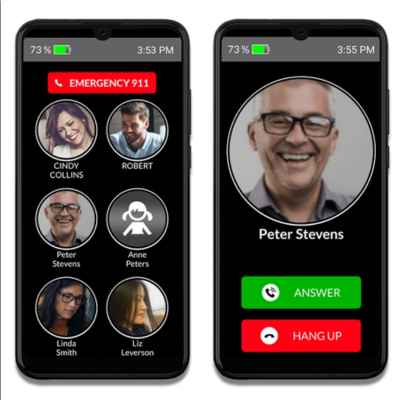
The RAZ Memory Cell Phone was built specifically for people with dementia, mild cognitive impairment, and other conditions that make a standard phone overwhelming. Its 6.5-inch screen shows up to six large photos of approved contacts — to call someone, your parent simply taps and holds their picture. There’s no app store, no web browser, and no way to accidentally navigate somewhere confusing.
Where this phone stands out is the RAZ Care companion app, which gives caregivers real remote control: adding or editing contacts, monitoring battery level and signal strength, viewing call history, setting quiet hours, and receiving alerts on 911 calls or low battery. The phone also includes GPS location tracking and even supports Voiceitt speech-recognition technology, which can translate non-standard speech (from a stroke or speech disability) into clear audio during video calls.
Price: Around $349 for the device, with wireless service typically starting free for the first few months and running about $20/month afterward, on an unlocked phone compatible with major U.S. carriers.
Pros: Purpose-built for dementia; genuinely simple photo-dial interface; strong remote management tools; GPS included.
Cons: Higher upfront cost than a basic flip phone; monthly service adds up over time; limited to calling and video calling (no texting flexibility by design, which some families see as a pro instead).
2. Jitterbug Flip2 by Lively — Best Simple, Budget-Friendly Option
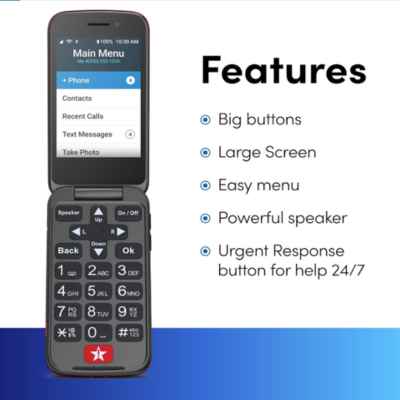
For a parent in earlier or milder stages of dementia, or for a family on a tighter budget, the Jitterbug Flip2 offers a lot of the same safety logic in a more traditional, familiar flip-phone form factor. It has large, physical buttons, a bright screen with big text, and a dedicated Urgent Response button that connects to a live agent (with an eligible plan), not just a text alert.
Paired with the Lively Link app, family members can see location, set up approved contacts, and get notified of urgent response calls. The Flip2 also supports Alexa built-in for hands-free requests like weather or reminders, and is hearing aid compatible.
Price: Frequently discounted, often listed around $39.99 (regularly $79.99), plus a monthly service plan starting around $2–$25/month depending on the tier and whether Urgent Response/Lively Link are included.
Pros: Familiar flip-phone design many seniors already know; genuinely affordable; physical buttons are easier for some users than a touchscreen; real live-agent urgent response available.
Cons: Less restrictive than the RAZ phone by default (contacts and calling need to be configured carefully); no photo-dial home screen; better suited to earlier-stage dementia than more advanced cognitive decline.
3. iPhone with Assistive Access — Best for Families Already Using Apple

If your parent already owns an iPhone, or your family is already using Find My and other Apple tools to stay connected, it’s worth knowing about Assistive Access before buying a new device. It’s a free, built-in iOS feature — not a separate product — that transforms a regular iPhone into a distinctly simplified experience: large, image-first icons, a curated selection of apps (Calls, Camera, Messages, Music, Photos, and a few others), and options like an emoji-only keyboard or video messages for people who struggle with reading and typing.
A trusted family member sets it up, choosing exactly which apps and features appear and how the layout looks (grid or list), and can lock changes behind a passcode so your parent can’t accidentally exit the simplified mode or change settings.
Price: Free if your parent already has a compatible iPhone; otherwise, the cost of whichever iPhone model you choose (new or used).
Pros: No new device or number needed if they already have an iPhone; full Find My location sharing built in; free to activate; highly customizable by a caregiver.
Cons: Requires an iPhone, which costs more upfront than a basic flip phone if starting from scratch; some families find it more complex to set up correctly than a purpose-built device; best suited for earlier-stage dementia where some smartphone familiarity remains helpful.
Quick Comparison
| Phone | Best For | Interface | GPS | Approx. Price |
|---|---|---|---|---|
| RAZ Memory Cell Phone | Moderate dementia, families wanting maximum simplicity | Photo-dial, 6 contacts | Yes | ~$349 + ~$20/mo |
| Jitterbug Flip2 | Early-stage dementia, budget-conscious families | Physical buttons, large text | Yes (with Lively Link) | ~$40–80 + plan |
| iPhone + Assistive Access | Families already on iPhone/Apple ecosystem | Large icons, curated apps | Yes (Find My) | Free feature (iPhone cost varies) |
Other Notable Options Worth Knowing About
The three phones above cover most families’ needs, but a couple of other devices come up often enough that they’re worth a mention, even though they didn’t make the top three:
GrandPad
Technically a tablet rather than a phone, the GrandPad runs on its own 4G LTE connection (no separate Wi-Fi needed) and is built around a “Family Circle” system, where a designated family administrator curates every contact who’s allowed to reach your parent, filtering out scam calls and texts by design. It includes video calling through a simplified Zoom interface, voice messaging, photo sharing, and a set of pre-loaded games and activities meant to support engagement, not just safety. Pricing typically runs around $299 for the device (or a low monthly financing option) plus about $40/month for service, with a 30-day satisfaction guarantee. It’s a strong option for families who want more than calling — games, photos, and video chat — in one tightly controlled device.
Snapfon ez4G
The Snapfon ez4G is a big-button flip-style phone with a high-contrast, illuminated keypad and buttons designed to be identified by feel, not just sight. It includes a one-touch SOS button that can alert up to five contacts by call and text, optional fall detection, and GPS. A “numbers that speak” feature reads dialed numbers aloud, which can help users with vision changes confirm they’ve dialed correctly. It’s a reasonable middle-ground option between the RAZ phone and the Jitterbug Flip2, particularly for someone who needs strong vision and hearing accommodations in addition to simplicity.
Return Policies and Trial Periods
Because every person with dementia responds differently to a new device, it’s worth checking the return or trial window before committing to any of these options. Lively/Jitterbug and GrandPad both typically offer a satisfaction guarantee window (commonly 30 days) during which you can return the device or adjust the plan if it isn’t working out. The RAZ Memory Cell Phone’s return policy is worth confirming directly with the retailer at the time of purchase, since terms can change. Whatever you choose, buying from a retailer with a clear, generous return policy takes some of the pressure off getting it exactly right on the first try.
Matching the Phone to the Stage of Dementia
The “best” phone changes depending on where your parent is in their journey:
- Early stage: Many people can still manage a simplified smartphone. Assistive Access on an existing iPhone, or a Jitterbug Smart-series device, may work well while preserving some independence and familiarity.
- Middle stage: This is where purpose-built options like the RAZ Memory Cell Phone or the Jitterbug Flip2 tend to shine — simple enough to avoid confusion, but still genuinely usable for placing and receiving calls independently.
- Late stage: As communication ability declines further, a phone may become less useful than a wearable medical alert device or a caregiver-monitored system, since placing or answering calls may no longer be realistic. It’s worth revisiting this decision periodically rather than assuming the first phone you choose is permanent.
Total First-Year Cost Comparison
Sticker price only tells part of the story, since monthly service adds up over a full year. Here’s roughly what each option costs across a first year of ownership, combining device and typical service costs:
| Phone | Device Cost | Approx. Annual Service | Approx. First-Year Total |
|---|---|---|---|
| RAZ Memory Cell Phone | ~$349 | ~$180–$240 (after free trial months) | ~$530–$590 |
| Jitterbug Flip2 | ~$40–$80 | ~$24–$300 depending on plan tier | ~$65–$380 |
| iPhone + Assistive Access | Varies (existing phone or new purchase) | Existing phone plan | Feature itself is free |
These are rough estimates based on publicly listed pricing at the time of writing; confirm current plan details directly with each provider, since promotions and plan tiers change often.
Involving Your Parent in the Choice
Where possible, involve your parent in picking their own phone, even if their input is limited to choosing a color or trying two options side by side. A device your parent had some say in tends to be met with less resistance than one that simply appears one day as a replacement for something familiar. For a parent in early-stage dementia especially, this small amount of agency can matter more than any individual feature on the spec sheet.
What About Just Using a Family Locator App Instead?
Some families wonder whether a location-sharing app on your parent’s existing phone (like Life360 or Find My) could solve the problem without buying anything new. It can work, but usually only in early-stage dementia, and only if your parent can still reliably keep the phone charged, carry it consistently, and avoid accidentally disabling location services or uninstalling the app. As cognitive symptoms progress, a phone that requires ongoing troubleshooting from your parent tends to become unreliable exactly when you need it most reliable — which is usually the point where switching to one of the simplified, caregiver-managed options above makes the most sense.
Setting Up the Phone for Success
The device itself is only half the equation — how you introduce and set it up matters just as much:
- Pre-program every contact before handing it over, including yourself, other close family, and 911 if the phone supports it, so your parent never has to add a contact themselves.
- Use real, recent photos for photo-dial contacts — a photo from 20 years ago may not be recognizable anymore.
- Practice together, more than once, in a calm moment, not during an emergency or a rushed morning.
- Keep the charger in one consistent, visible spot, and consider a charging dock or stand rather than a plug-in cable, which is easier to forget or misplace.
- Avoid switching phones once your parent has adjusted to one — the learning curve is real, and unnecessary changes can undo months of familiarity.
- Label the phone itself with your name and number on a sticker, in case it’s found by someone else while your parent is out.

A Note on GPS Tracking: What It Can and Can’t Do
GPS location sharing is one of the single most valuable features on this list, but it’s worth understanding its real limits. According to the Alzheimer’s Association, no location tracking system is 100% accurate, and performance can suffer indoors or in areas with poor signal or bad weather. Location tracking tells you general vicinity, not a live video feed of what’s happening, and it works best paired with other safety measures — door alarms, neighbor check-ins, a Medic Alert enrollment, and regular in-person visits — rather than relied on as a single solution.
Common Mistakes Families Make
- Choosing the phone that’s easiest for the caregiver, not the parent. A feature-rich smartphone might be simple for you, but overwhelming for someone with dementia. Prioritize their experience, not your own convenience.
- Skipping the trial period. Most of these phones and plans allow returns or plan changes within a window — use it if the fit isn’t right rather than forcing an unworkable device to stick.
- Not locking down the contact list. An open phone book is an open door to scam calls; take the time to restrict incoming calls and texts to approved contacts only.
- Forgetting to test GPS accuracy in your parent’s actual home and neighborhood, rather than assuming it works everywhere equally well.
- Waiting too long to introduce the phone. Introducing a simplified phone earlier, while your parent can still participate in learning it, tends to go far more smoothly than switching after a crisis.
- Assuming one phone will work forever. Dementia progresses, and a phone that worked well a year ago may become too complex or simply unnecessary as needs change. Plan to reassess the choice periodically rather than treating it as a one-time decision.
- Overlooking hearing and vision changes. A phone that’s technically simple can still fail if the text is too small to read or the speaker isn’t loud enough — test these details with your parent specifically, not just in the store.
Phones vs. Medical Alert Devices: Do You Need Both?
A phone and a medical alert pendant or wearable solve slightly different problems. A phone lets your parent make and receive calls and gives you general location awareness. A dedicated medical alert device is typically built around a single urgent button press, often with fall detection, and is designed to be worn constantly (on a wrist or around the neck) in a way a phone usually isn’t. For many families, especially once a parent reaches the middle or later stages of dementia, the two work best together: a simplified phone for everyday connection, and a wearable alert device for the moments a phone might be forgotten, lost, or out of reach.
Resources at Elder Care Haven
[INTERNAL LINK TODO: link to your related articles here, e.g. “Late Stage Dementia: How to Support Your Parent and Family” and “What to Expect in the Final Stages of Dementia”]
The Bottom Line
There’s no single best phone for every family — the right choice depends on your parent’s stage of dementia, how much structure they need, and how tech-familiar your family already is. The RAZ Memory Cell Phone offers the most dementia-specific design and remote control for caregivers. The Jitterbug Flip2 offers real simplicity and safety at a lower cost. And Assistive Access lets families already using an iPhone simplify what they have rather than starting over. Whichever you choose, the setup and practice you do together will matter just as much as the device itself.
Frequently Asked Questions
What is the best phone for a parent with dementia?
The RAZ Memory Cell Phone is generally considered the most dementia-specific option, with photo-based dialing and full remote caregiver management. For a simpler, more affordable option, the Jitterbug Flip2 offers large buttons and an urgent response button. Families already using an iPhone may prefer Apple’s free Assistive Access feature instead of buying a new device.
Do phones for dementia patients have GPS tracking?
Yes, most phones designed for seniors with dementia, including the RAZ Memory Cell Phone, the Jitterbug Flip2 with Lively Link, and an iPhone with Find My enabled, include some form of GPS location sharing for caregivers.
How do I stop my parent from getting scam calls on their phone?
Choose a phone that lets you restrict incoming calls and texts to a pre-approved contact list, like the RAZ Memory Cell Phone or a properly configured Jitterbug device. This blocks unknown numbers, including common scam calls, from reaching your parent at all.
How much does a dementia-friendly phone cost?
Costs vary widely. The Jitterbug Flip2 is typically the most affordable, often listed around $40 with plans starting around $2–$25/month. The RAZ Memory Cell Phone runs around $349 plus roughly $20/month for service. Apple’s Assistive Access is a free feature if your parent already owns a compatible iPhone.
Is a flip phone or a smartphone better for someone with dementia?
It depends on the stage of dementia and the person’s prior comfort with technology. A simplified flip phone or purpose-built device like the RAZ phone tends to work better as cognitive decline progresses, while a simplified smartphone (like an iPhone with Assistive Access) can work well in earlier stages for someone who’s used a smartphone for years.
Can I track my parent’s location if they wander?
Most dementia-friendly phones include GPS location sharing that lets you check your parent’s general location from a caregiver app. However, the Alzheimer’s Association notes that no location tracking system is 100% accurate, so it should be used alongside other safety measures, not relied on alone.
Should I get a phone or a medical alert device for my parent?
They serve different purposes and often work best together. A phone supports everyday calling and general location awareness, while a wearable medical alert device is built around a dedicated emergency button, often with fall detection, and is designed to be worn constantly, unlike a phone that can be set down or lost.
How do I set up a new phone for a parent with dementia?
Pre-program all contacts before handing over the phone, use recent recognizable photos for photo-dial features, practice together during a calm moment, keep the charger in one consistent spot, and avoid switching devices again once your parent has adjusted to one.
Is the GrandPad better than a phone for someone with dementia?
The GrandPad is a tablet, not a phone, and adds video calling, photo sharing, and simple games on top of curated, scam-filtered contacts. It can be a good fit for families who want more engagement features in one device, while a purpose-built phone like the RAZ Memory Cell Phone stays more tightly focused on calling and safety.
Can I return the phone if it doesn’t work out for my parent?
Most retailers offer a trial or satisfaction guarantee window, often around 30 days, for phones like the Jitterbug Flip2 and GrandPad. Confirm the specific return policy and timeframe with the retailer before purchasing, since terms and promotions change.